Have you ever tried to make a classroom quiz more interesting, only to find that students lose interest after a few questions? A regular worksheet can feel repetitive, especially when learners need to review the same facts several times.
Blooket offers another approach. It turns question-based practice into interactive games that students can play with classmates or complete independently. The key is choosing the right game, finding useful questions, and making sure the fun supports actual learning.
Blooket is an online educational platform that combines quizzes with interactive games. Teachers can create or discover question sets, host live sessions, and assign independent practice. Students can join many games using a game code, QR code, or shared link without creating an account.
What Is Blooket?
Blooket is a web-based learning platform designed to make quiz practice more engaging. It uses question sets as the foundation for different game modes, allowing the same educational material to be used in different activities.
For example, a teacher might create questions about multiplication, English grammar, science, or historical events. Students answer those questions while playing a selected game. Depending on the mode, correct answers can help them progress, collect rewards, or compete with other players.
The platform supports classroom activities, individual revision, and homework. Teachers can choose existing question sets or prepare their own material to match a lesson.
Blooket is pronounced “Blue-kit.” Its small cartoon characters are called Blooks, and students can select them in supported activities.
You can visit the official website at Blooket.com.
How Does Blooket Work?
The basic process is straightforward. A teacher selects a question set, chooses a game mode, and starts a session or assigns an activity. Students then answer questions through their devices.
Unlike a traditional quiz, the game mechanics can change how the activity feels. Some modes focus on speed and competition, while others involve collecting items, managing resources, or progressing through a game.
The educational questions remain central to the activity. However, game rewards and competition can distract students if the activity is poorly matched to the lesson. Teachers should select a mode that supports the learning objective rather than choosing one based on entertainment alone.
Blooket also offers independent study options, so students do not always need a live classroom session to practise a topic.
How to Join a Blooket Game With a Code
Joining a live Blooket game usually takes only a few steps. You need the game code or another joining method provided by the host.
- Open play.blooket.com.
- Enter the game ID supplied by your teacher.
- Enter an appropriate nickname if prompted, or use a randomly assigned name when that option is enabled.
- Choose a Blook if the game asks you to.
- Wait for the host to start the session and follow the instructions on the screen.
These steps follow Blooket’s student joining process.
Can You Join Blooket Without an Account?
Yes. Students can join many live games without a Blooket account when they have the required game code, QR code, or joining link. Teachers need an account to host games.
An account can provide extra features, such as tracking personal statistics, collecting Blooks, and playing independently. Creating an account is therefore optional for basic participation in many classroom games.
Remember that a game code is specific to a hosted session. If a code no longer works, ask the teacher for the current code or link instead of assuming that an old one will remain active.
How to Play Blooket on Your Own
You don’t always need a teacher to host a live game. Blooket supports solo activities using available question sets.
To get started, visit the website, open the Discover section, and search for a topic. Select a suitable question set, choose the available solo-play option, and pick a game mode.
For example, a student preparing for a biology test could search for questions about cells, select a relevant set, and practise independently. The same process can work for vocabulary, geography, mathematics, and other subjects.
Blooket’s Study mode offers a flashcard-style way to review material without relying on the more elaborate mechanics found in other game modes.
The quality of the question set matters. A popular set may contain outdated information, unclear answers, or material that does not match your class syllabus. Check the questions before relying on them for exam preparation.
Popular Blooket Game Modes
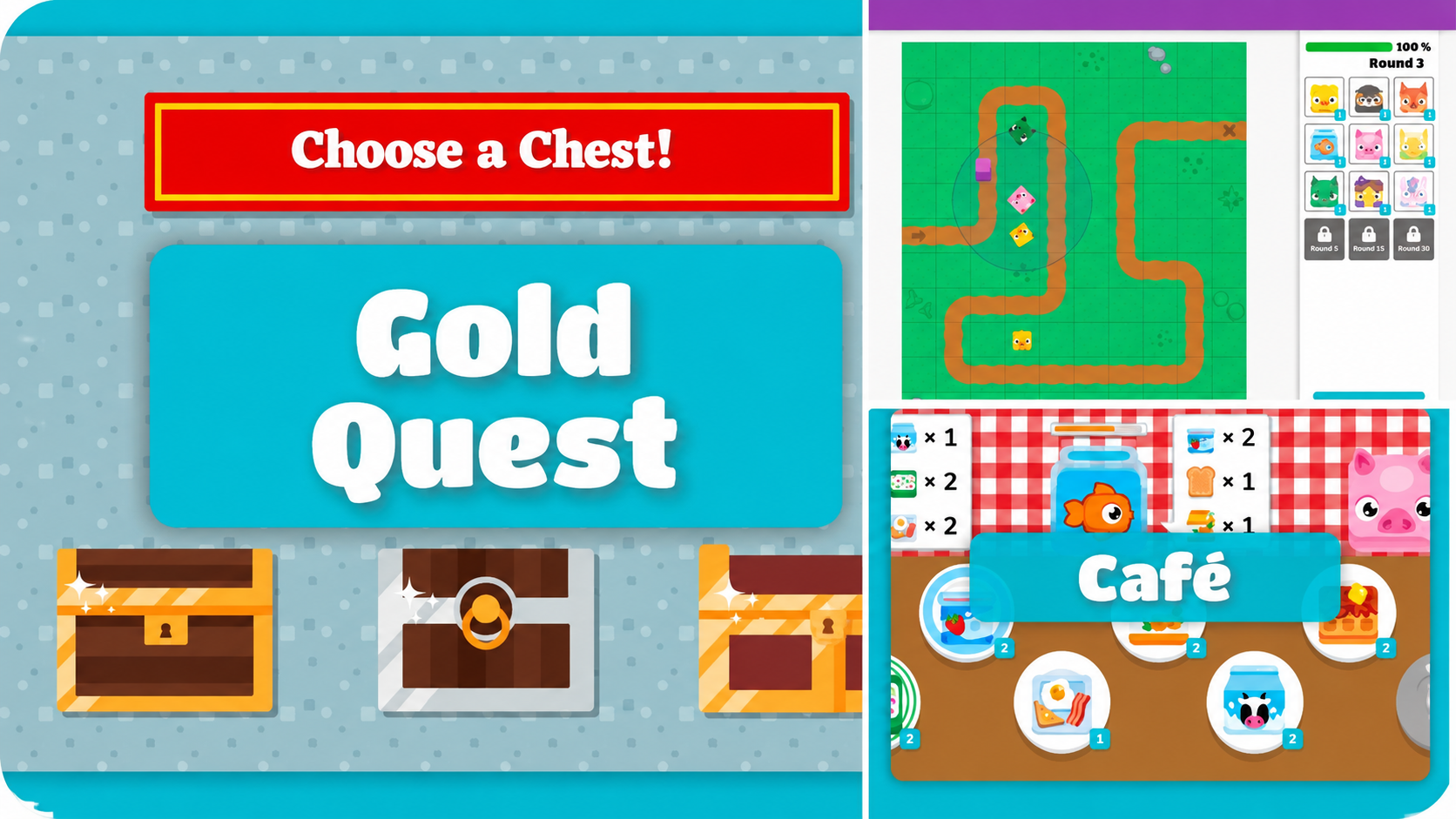
Blooket offers a range of game modes that use educational questions in different ways. Availability depends on the mode, subscription level, and whether the activity supports live play, solo play, or homework.
Gold Quest
Gold Quest adds a reward-based element to question practice. Students answer questions and encounter opportunities to gain or lose gold, making the outcome less predictable than a simple score-based quiz.
It can work well for short review sessions, although teachers should explain that in-game rewards are separate from actual subject mastery.
Tower Defense
Tower Defense combines question answering with defensive strategy. Players use their progress to develop a defence against incoming enemies.
This format may suit students who enjoy planning and longer activities. Teachers should check the expected session length and complexity before using it with a class.
Café
Café combines quiz questions with a restaurant-management theme. Players use their progress to serve customers and manage their virtual café.
The setting can make repeated practice more appealing to some students, but teachers still need to review whether the questions match the lesson.
Racing
Racing connects correct answers with progress in a race. It can be a useful option for brief revision activities when the class responds well to competition.
Classic
Classic provides a more direct quiz-style experience. It can be a sensible choice when the teacher wants students to concentrate on questions rather than spend much time learning additional game mechanics.
Practical tip: Preview the game mode before the lesson. A format that works for a short vocabulary review may not be the best choice for a detailed science assessment.
How Teachers Can Create a Blooket Quiz
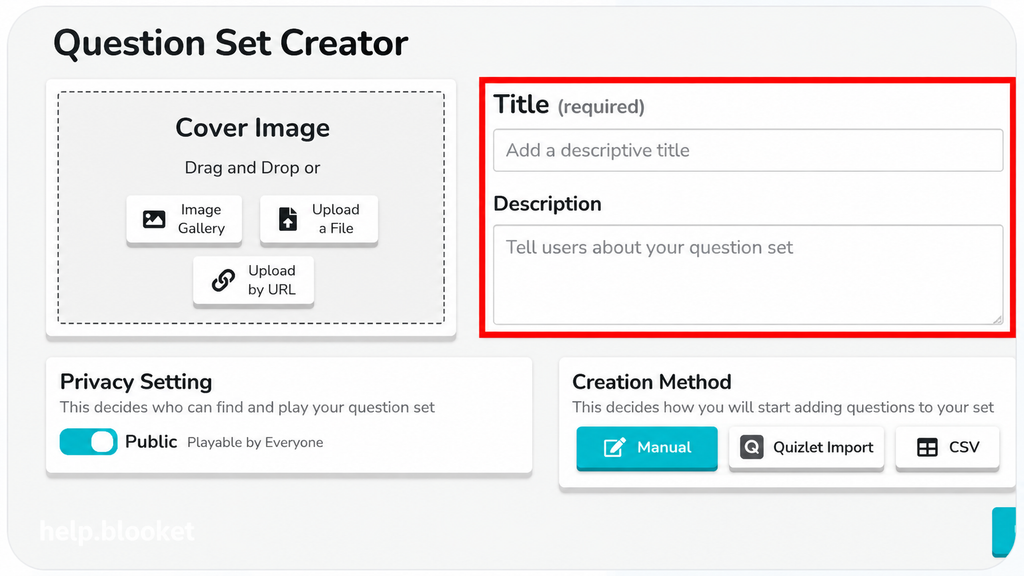
Teachers can build their own question sets instead of depending entirely on material created by other users.
The process begins with the Create section. Teachers give the set a title, add a description, and enter questions and answers. They can also choose whether the set is public or private.
A useful question set should have a clear purpose. Before building one, decide what students should know or be able to do by the end of the activity.
For example, a set for an English lesson could focus on identifying verbs in sentences. A mathematics set could target multiplication facts that students frequently answer incorrectly.
Blooket supports multiple-choice and typing-answer questions. Multiple-choice questions can include two to four answer options, while typing-answer questions require students to produce a response.
When writing questions, keep these points in mind:
- Use clear wording that matches the students’ reading level.
- Make sure each marked answer is correct.
- Avoid answer choices that are confusing because of poor wording.
- Mix easier questions with more challenging ones when appropriate.
- Review the complete set before using it with students.
A short, carefully checked question set is often more useful than a large collection of questions that repeat the same fact without testing understanding.
How to Assign Blooket Homework
Blooket also supports activities that students complete outside a live classroom session.
A teacher can choose a question set, select a supported homework or solo activity, configure the available assignment settings, and share the resulting link or QR code with students.
Students open the assignment, enter a nickname when prompted, choose an available game mode, and work toward the teacher’s completion goal. Basic participation in many homework activities does not require a student account.
Homework works best when expectations are clear. Tell students what they need to practise, when the assignment is due, and whether they must reach a particular correct-answer goal.
Teachers should also consider whether students have reliable internet access and a suitable device. If a learner cannot access the assignment, a paper-based or offline alternative can help keep the learning task fair.
Is Blooket Free?
Yes. Blooket offers a free Starter option, as well as paid Blooket Plus and group plans. The free option supports creating and discovering question sets and playing a range of games.
The paid plan adds features for users who need more capacity or advanced tools.
| Feature | Starter | Blooket Plus |
|---|---|---|
| Create and discover question sets | Yes | Yes |
| Standard game modes | Available modes | Available modes plus eligible Plus-only modes |
| Maximum live players | Up to 60 | Up to 300 |
| Enhanced reports | Limited reporting | Additional reporting features |
| Longer homework deadlines | Up to 14 days | Up to 365 days |
Plan terms and available features may change, so check the official Blooket website for current pricing and subscription details before purchasing.
For a teacher who runs occasional review sessions, the free plan may be enough. A school that needs larger live games, enhanced reports, or longer homework deadlines may want to compare the paid options.
Benefits and Limitations of Blooket
Blooket’s main strength is that it gives teachers several ways to present the same questions. Changing the activity can make revision feel less repetitive, especially when students respond well to interactive tasks.
It can also make classroom participation easier to organise because students can join a hosted session without individual accounts. Teachers can reuse question sets, prepare activities for different topics, and use independent practice where suitable.
However, Blooket is not a replacement for every teaching method. A student might become good at playing a particular mode without fully understanding the underlying concept. Competitive activities can also create pressure for learners who need more time to process questions.
Teachers should balance game-based practice with explanation, written work, discussion, and direct feedback. After a session, reviewing incorrect answers can help reveal whether students understand the topic or have simply memorised familiar questions.
The most useful measure of success is what students can explain or do after the game, not just who finishes first.
Blooket vs. Kahoot! and Gimkit
Blooket, Kahoot!, and Gimkit all offer game-based learning, but their activities have different styles.
| Platform | Main appeal | Best suited for |
|---|---|---|
| Blooket | Multiple game modes built around question sets | Varied classroom review activities |
| Kahoot! | Live quizzes and competitive group participation | Host-led quiz sessions |
| Gimkit | Strategy and game mechanics built around earning and spending in-game currency | Students who enjoy strategic gameplay |
These are broad distinctions rather than a claim that one platform is best for every classroom. Features, access limits, and pricing can change, so compare the official plans before making a decision.
If you’re already using Blooket successfully, you may not need to switch. Try another platform when you have a specific need that your current setup does not meet.
Is Blooket Safe for Students?
Blooket provides ways to participate without requiring students to create accounts for every activity. That can simplify classroom access, but teachers and parents should still pay attention to privacy, usernames, and the content being used.
Use appropriate nicknames, avoid sharing personal information in public game names, and make sure students follow school technology rules. Teachers should review public question sets before sharing them, since user-created material may not always suit the intended age group or lesson.
For younger students, supervision and clear expectations are helpful. Schools should also review Blooket’s current privacy policy and applicable district requirements before adopting the platform for regular classroom use.
For technical problems, Blooket’s official help center provides guidance on joining games, account access, and connection issues.
Tips for Getting Better Results With Blooket
The best way to use Blooket is to connect the activity to a specific learning goal.
Start by choosing a small set of skills or facts that students need to review. Check the questions, select an appropriate mode, and explain the purpose of the session before students begin.
After playing, ask students to explain a few answers in their own words. This gives the teacher a chance to identify misconceptions that a game score might not reveal.
It also helps to use Blooket selectively. If every lesson becomes a competition, the format may lose its appeal and leave less time for deeper work. Use it when the activity adds value, then switch to another method when students need more detailed instruction.
For independent learners, repeating a question set can help with recall, but it should not be the only way to prepare for an exam. Students also need to apply ideas to unfamiliar questions and explain why their answers are correct.
Frequently Asked Questions About Blooket
1. What is Blooket used for?
Blooket is used for educational quizzes, classroom review, independent practice, and homework. Teachers can choose or create question sets and use them in different game modes.
2. How do I join a Blooket game?
Visit play.blooket.com and enter the game code supplied by the host. You can also join using a QR code or shared link when the teacher provides one.
3. Can I play Blooket without signing up?
Yes. Students can join many live games and complete homework without creating an account. An account provides additional features such as tracking personal statistics and collecting Blooks.
4. Is Blooket free to use?
Blooket offers a free Starter plan and paid options. The free plan supports core question-set and game features, while Plus adds benefits such as larger live games and enhanced reports.
5. Can I use Blooket for homework?
Yes. Teachers can assign supported activities and share a homework link or QR code. Students can complete the activity independently within the assignment settings and deadline.
6. Is Blooket better than Kahoot!?
Neither is automatically better. Blooket offers different game formats around question sets, while Kahoot! may suit teachers who prefer a direct live-quiz experience. Choose according to your lesson goals and students’ needs.
Final Thoughts
Blooket gives teachers and students a practical way to turn question practice into interactive activities. Its game modes, shared question sets, and options for live sessions or independent work make it useful for many types of classroom revision.
The best starting point is simple: visit the official website, find a question set that matches your subject, and try one suitable game mode. Review what students learned afterward to see whether the activity helped them understand the material.
READ MORE: SNewspaper